

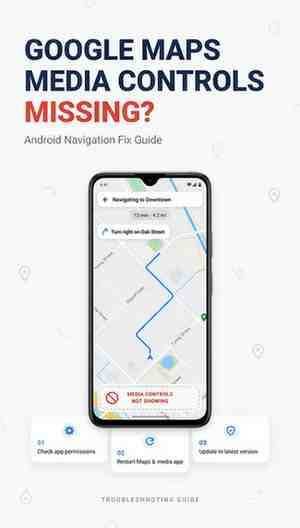
Google Maps media controls removed has become a widely searched topic among Android users who rely on navigation and in app music controls while driving. Many users recently noticed that the familiar media playback buttons disappeared from the navigation screen, creating confusion and raising questions about whether the feature was permanently removed or temporarily unavailable.
This guide explains what happened, why Google Maps media controls removal became a trending search term, how the change affects drivers, available workarounds, and what users can expect moving forward.
Understanding the Google Maps Media Controls Feature
For years, Google Maps allowed drivers to control supported music and podcast applications directly from the navigation interface. Users could play, pause, skip tracks, and switch between supported media apps without leaving the map screen.
This functionality became particularly useful for commuters, delivery drivers, rideshare operators, and travellers who needed navigation and entertainment controls available in one place.
The feature worked alongside popular media applications and reduced the need to switch between apps while driving.
Why Are People Searching for “Google Maps Media Controls Removed”?
The search phrase gained popularity after many Android users discovered that media playback controls suddenly disappeared from Google Maps navigation.
Common complaints included:
- Missing play and pause buttons
- No visible Spotify controls
- Disappearing YouTube Music integration
- Missing default media app settings
- Navigation settings change after updates
As a result, users began searching for answers regarding Google Maps media controls removed, Google Maps missing music controls, and Google Maps playback controls gone.
What Changed in Google Maps?
Recent Google Maps updates altered how media controls appear during navigation.
Users reported that:
- The media playback control toggle disappeared.
- Navigation settings looked different.
- Default music app selection options were removed.
- Music controls no longer appeared during active navigation.
The change was primarily reported on Android devices, while many iPhone users continued to see media integrations available within Google Maps.
For drivers who regularly listen to music, audiobooks, or podcasts, the absence of playback controls significantly changed the navigation experience.
Was the Feature Intentionally Removed?
Reports from multiple technology publications indicated that the disappearance of media controls appeared to be related to a software issue rather than a permanent feature removal. Google later acknowledged that a bug was affecting media playback controls and that a fix was being developed.
This information provided reassurance to users concerned that Google Maps media controls would become a permanent change.
How the Removal Affects Drivers
The impact varies depending on driving habits and vehicle setup.
Daily Commuters
Commuters often use navigation while listening to music or podcasts. Without integrated controls, they must switch applications more frequently.
Delivery Drivers
Food delivery and courier drivers depend on quick access to navigation and media. The loss of integrated controls can increase distractions.
Travelers
Road trip travellers frequently use navigation and streaming services simultaneously. Missing controls create additional steps when managing playlists or podcasts.
Older Vehicles Without Android Auto
Many drivers use phone mounts because their vehicles do not support Android Auto. Integrated media controls inside Google Maps were particularly valuable for these users.
Alternative Ways to Control Media
If media controls are unavailable, several alternatives remain.
Use Android Auto
Vehicles equipped with Android Auto typically provide dedicated media controls through the infotainment system.
Voice Commands
Google Assistant or Gemini voice commands can often control playback without requiring manual interaction.
Examples include:
- Play music
- Pause podcast
- Skip track
- Resume playback
Notification Controls
Android notification panels continue to provide quick media playback controls for supported applications.
Smart Steering Wheel Controls
Many vehicles include steering wheel buttons that can control music playback independently of Google Maps.
Common Troubleshooting Steps
Users experiencing missing media controls can try the following:
Update Google Maps
Install the latest version through the Play Store.
Clear Cache
Clearing temporary app data may resolve interface issues.
Restart the Device
A simple restart can refresh system integrations.
Reinstall Google Maps
Removing and reinstalling the application may restore missing features.
Verify Permissions
Check that media applications and Google Maps have the required permissions enabled.
Google Maps and Driving Technology in 2026
The driving experience continues to evolve rapidly.
Google is expanding navigation technology, AI-powered assistance, vehicle integration, and connected driving features. Modern Android Auto systems now support enhanced widgets, larger display compatibility, and improved in car experiences.
Drivers visiting London during summer 2026 can see these technologies in action while navigating popular attractions such as:
- The British Museum
- Tower of London
- Buckingham Palace
- Westminster Abbey
- The London Eye
Visitors attending summer events often rely heavily on navigation apps due to congestion zones, limited parking areas, public transport diversions, and large tourist crowds.
Drivers planning city visits should review parking restrictions, public transport options, and congestion charging requirements before entering central London.
Frequently Asked Questions
Why did Google Maps media controls disappear?
Many reports indicated the issue was caused by a software bug affecting Android versions of Google Maps rather than a planned removal.
Are Google Maps media controls permanently removed?
Current evidence suggests the disappearance was temporary and related to technical issues rather than a permanent feature retirement.
Does Google Maps still support Spotify?
Google Maps continues to support Spotify integration in compatible environments, though availability may vary by version and device configuration.
Why can’t I see music controls while navigating?
Software updates, account settings, app permissions, device compatibility, or temporary bugs can affect media playback controls.
Does Android Auto still have media controls?
Yes. Android Auto continues to provide extensive media playback functionality through compatible vehicle systems.
Conclusion
Google Maps media control removal became a major discussion point among Android users because the feature played an important role in safe and convenient navigation. While the disappearance initially appeared to signal a permanent change, subsequent reports indicated that a software issue was responsible and that restoration efforts were underway.
For users who depend on navigation and entertainment during daily driving, staying updated with the latest Google Maps releases remains the most effective way to regain missing functionality. As navigation technology continues to evolve throughout 2026, drivers can expect further integration between maps, media, AI assistants, and vehicle infotainment systems.







Leave a Reply